
Introduction
This document describes the various messages that are available to interact with Moventum, to programmatically send and receive data,
such as create new accounts and placing market orders. In addition there are example messages and details on each message field.
Connection requires a successful authentication that will return a token
Adding this token into the header of the message will allow you send a further message request.
After making any successful request the server will return a response id
that can be used as reference to check the status of the request - check status.
Field types
There are a number of field types that are supported in the Moventum System procesing environment.
| Field Types | Description |
|---|---|
| date | A complete date with a four-digit
year. Format: yyyy-mm-dd Example: "2010-03-19" |
| text or string | Any valid UTF-8 sequence of
characters. Example: "Lorem ipsum dolor sit amet, consectetur adipiscing elit, sed do eiusmod tempor incididunt ut labore et dolore magna aliqua. " |
| currency code | The ISO code of the currency
list. Example: "USD", "EUR", etc. https://www.iban.com/currency-codes for complete referece |
| country | The ISO code of the country
list. Example: "UK", "DE", etc. https://countrycode.org/ for complete reference |
| An email address. Example: "crm@moventum.com" |
|
| boolean | A boolean value, true or
false. Example: "true" |
Authentication
Authentication is done using JSON Web Token an open standard (RFC 7519) that defines a compact and self-contained way for securely transmitting information between parties as a JSON object. This information can be verified and trusted because it is digitally signed. JWTs can be signed using a secret (with the HMAC algorithm) or a public/private key pair using RSA or ECDSA. https://jwt.io/introduction/ for more information.
To authenticate, use this code:
# With shell, you can just pass the correct header with each request and the entire command should be in just one line
curl "https://api-pilot.moventum.lu/authenticate" -X POST \
  -H "Content-Type: application/xml" \
  -d "<jwtRequest>  \
        <username>your username</username>  \
        <password>your password</password>  \
      </jwtRequest>"  \
curl "https://api-pilot.moventum.lu/authenticate" -X POST  \
  -H "Content-Type: application/json"  \
  -d "{  \
      "username": "your username",  \
      "password": "your password"  \
     }"
Moventum expects for the JWT token to be included in all API requests to the server in a header that looks like the following:
Authorization: Bearer <token>
The above command will respond with authentication token that should be used in a header for all further requests.
<ApiResponse>
  <response>eyJhbGciOiJIUzUxMiJ9.eyJzdWIiOiIyMDAzMjUyLmhlemVsIiwiaWF0IjoxNjYzNjc4MTE5LCJleHAiOjE2NjQyNzgxMTl9.d0duXHIFHLaaD7A91AqV9wGrBcsqbFVbKCAFQ_Bi8Dqitn1HHI_fo4D1BxJjjgwjf4sKDkW4I6fHZTJhlpB9DA</response>
</ApiResponse>
Or JSON respectively
{
  "response": "eyJhbGciOiJIUzUxMiJ9.eyJzdWIiOiIyMDAzMjUyLmhlemVsIiwiaWF0IjoxNjYzNjc4MTE5LCJleHAiOjE2NjQyNzgxMTl9.d0duXHIFHLaaD7A91AqV9wGrBcsqbFVbKCAFQ_Bi8Dqitn1HHI_fo4D1BxJjjgwjf4sKDkW4I6fHZTJhlpB9DA"
}
New account
After Authentication a message that creates new accounts can be sent in either JSON or XML format.
Account creation request example
curl "https://api-pilot.moventum.lu/account-creation-request/create" -X POST \
  -H "Authorization: Bearer <token>" \
  -H "Content-Type: application/xml"  \
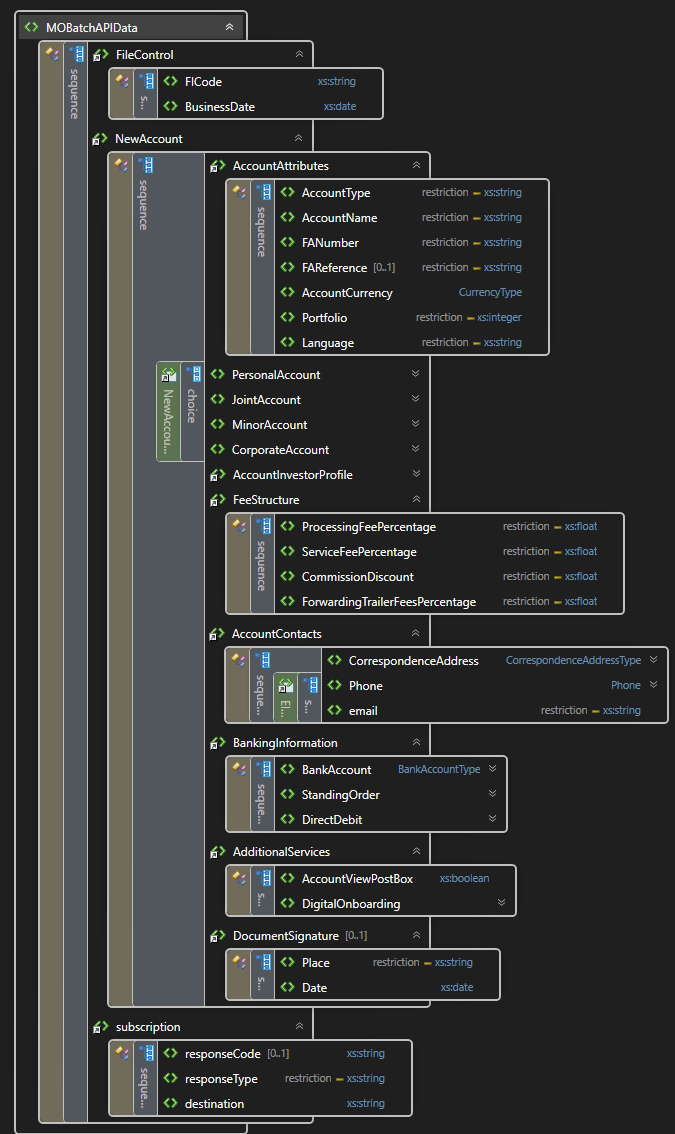
  -d "<MOBatchAPIData> \
        <subscription> \
		    <responseType>REST</responseType> \
		    <destination>http://your-end-point.com/url?your_first_reference=1000&your_second_reference=data</destination> \
	    </subscription> \
        <FileControl> \
          <FICode>FICODE</FICode>  \
          <BusinessDate>2022-01-07</BusinessDate>  \
        </FileControl> \
        <NewAccount> \
          <AccountAttributes> \
            <AccountType>J</AccountType> \
            <AccountName>JointAccountSample</AccountName> \
            <FANumber>9999999</FANumber> \
            <FAReference>ReferenceAccount</FAReference> \
            <AccountCurrency>978</AccountCurrency> \
            <Portfolio>42</Portfolio> \
          </AccountAttributes> \
          ...
        </NewAccount> \
      </MOBatchAPIData>"
curl "https://api-pilot.moventum.lu/account-creation-request/create" -X POST \
  -H "Authorization: Bearer <token>" \
  -H "Content-Type: application/json" \
  -d "{ \
          "subscription": {
            "responseType": "EMAIL", \
            "destination": "address@email.com" \
           },
          "FileControl": { \
            "FICode": "FICODE", \
            "BusinessDate": "2022-01-07" \
          } \
          ...
          "NewAccount": { \
            "AccountAttributes": { \
                "AccountType": "J", \
                "AccountName": "JointAccountSample", \
                "FANumber": 9999999, \
                "FAReference": "ReferenceAccount", \
                "AccountCurrency": "978", \
                "Portfolio": 42 \
            } \
            ...
          } \
      }"
The above command returns XML structured like this:
<ApiResponse>
  <response>acb123cba</response>
</ApiResponse>
Or JSON respectively:
{
  "response": "acb123cba"
}
A high level description of the dataset for Account Creation below for a detailed description visit the glossary page
Market order
A message that creates new market orders can be sent in either JSON or XML.
Market order request example
curl "https://api-pilot.moventum.lu/market-order-request/create" -X POST \
  -H "Authorization: Bearer <token>" \
  -H "Accept: application/xml" \
  -H "Content-Type: application/xml" \
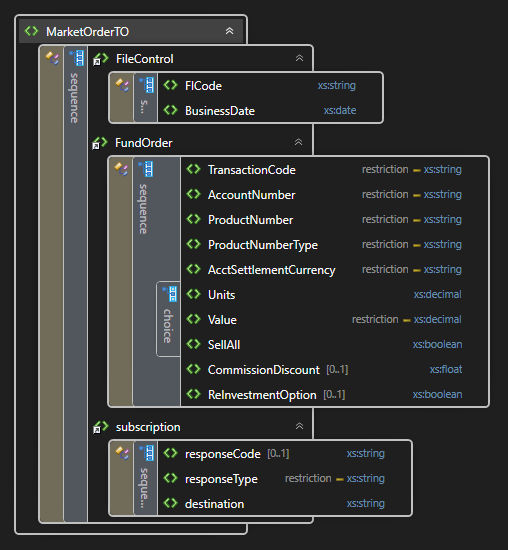
  -d "<MarketOrderTO>\
        <subscription> \
		    <responseType>EMAIL</responseType> \
		    <destination>your@email.com</destination> \
	    </subscription> \
        <FileControl> \
          <FICode>FICODE</FICode> \
          <BusinessDate>2022-01-07</BusinessDate> \
          </FileControl> \
        <FundOrder> \
            <TransactionCode>ACT</TransactionCode> \
            <AccountNumber>9999999</AccountNumber> \
            <ProductNumber>IE00B1TXLS18</ProductNumber> \
            <ProductNumberType>ISIN</ProductNumberType> \
            <AcctSettlementCurrency>USD</AcctSettlementCurrency> \
            <Units>2</Units> \
        </FundOrder> \
      </MarketOrderTO>"
curl "https://api-pilot.moventum.lu/market-order-request/create" -X POST \
  -H "Authorization: Bearer <token>" \
  -H "Accept: application/json" \
  -H "Content-Type: application/json" \
  -d "{
    "subscription": {
        "responseType": "REST", \
        "destination": "http://your-end-point.com/url?your_first_reference=1000&your_second_reference=data" \
    },
    "FileControl": { \
        "FICode": "FICODE", \
        "BusinessDate": "2022-01-07" \
    }, \
     \
    "FundOrder": { \
          "TransactionCode": "ACT", \
          "AccountNumber": 9999999, \
          "ProductNumber": "IE00B1TXLS18", \
          "ProductNumberType": "ISIN", \
          "AcctSettlementCurrency": "USD", \
          "Units": 2 \
    } \
}"
The above command with XML payload returns XML structured like this:
<ApiResponse>
  <response>7353194d29594b6a92629150b57e0290</response>
</ApiResponse>
Or with JSON payload returns JSON response respectively:
{
  "response": "7353194d29594b6a92629150b57e0290"
}
A high level description of the dataset for Market Order Creation below for a detailed description visit the glossary page
Systematic (dis)investment
A message that creates new systematic (dis)investment orders can be sent in either JSON or XML.
curl "https://api-pilot.moventum.lu/standing-order-request/create" -X POST \
  -H "Authorization: Bearer <token>" \
  -H "Accept: application/xml" \
  -H "Content-Type: application/xml" \
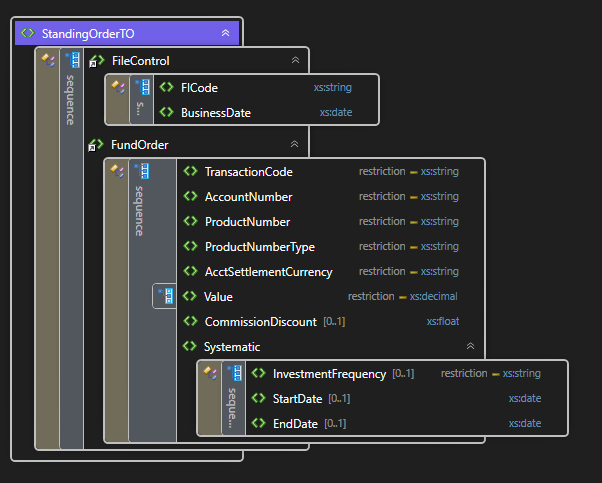
  -d "<StandingOrderTO>\
        <FileControl> \
          <FICode>FICODE</FICode> \
          <BusinessDate>2022-01-07</BusinessDate> \
        </FileControl> \
        <FundOrder> \
            <TransactionCode>AZP</TransactionCode> \
            <AccountNumber>9999999</AccountNumber> \
            <ProductNumber>IE00B1TXLS18</ProductNumber> \
            <ProductNumberType>ISIN</ProductNumberType> \
            <AcctSettlementCurrency>USD</AcctSettlementCurrency> \
            <Value>200.10</Value> \
            <systematic>  \
                            <investmentFrequency>ANNUAL</investmentFrequency> \
                            <startDate>2024-06-01</startDate> \
                            <endDate>2025-06-15</endDate> \
            </systematic> \
        </FundOrder> \
      </StandingOrderTO>"
curl "https://api-pilot.moventum.lu/standing-order-request/create" -X POST
                        -H "Authorization: Bearer <token>"
                        -H "Accept: application/json" \
                        -H "Content-Type: application/json" \
                        -d "{ \
                        "FileControl": { \
                          "FICode": "FICODE", \
                          "BusinessDate": "2022-01-07" \
                        }, \
                        { \
                          "FundOrder": { \
                              "TransactionCode": "EZP", \
                              "AccountNumber": 9999999, \
                              "ProductNumber": "IE00B1TXLS18", \
                              "ProductNumberType": "ISIN", \
                              "AcctSettlementCurrency": "USD", \
                              "Value": 200.10 \
                              "Systematic": { \
                                    "InvestmentFrequency":"MONTHLY", \
                                    "StartDate":"2024-01-01", \
                                    "EndDate":"2025-05-15" \
                              } \
                            } \
                          } \
                        } \
                    }"
The above command with XML payload returns XML structured like this:
 <StandingOrderResponse>
  <response>Standing order created successfully </response>
  <sequence>0000023</sequence>
  <status>Waiting approval from operations</status>
  </StandingOrderResponse>
Or with JSON payload returns JSON response respectively:
 {
 "response": "Standing order created successfully ",
 "sequence": "0000022",
 "status": "Waiting approval from operations"
 }
A command to cancel all systematic dis(investment) orders related to account number
curl "https://api-pilot.moventum.lu/standing-order-request/cance/{accountNumber}"
                        -X DELETE
  -H "Authorization: Bearer <token>"
 {
 "response": "All active standing orders have been cancelled"
 }
                        >
A command to cancel a systematic dis(investment) order related to account number with sequence number
curl "https://api-pilot.moventum.lu/standing-order-request/cance/{accountNumber}/sequence/1"
                        -X DELETE
  -H "Authorization: Bearer <token>"
 {
 "response": "Standing order with sequence 1 has been cancelled"
 }
A high level description of the dataset for Standing Order Creation below for a detailed description visit the glossary page
Check request status
This resource allows you to check the current status of your requests, and get the order Id as well
if it
exists.
For account creation there are following statuses:
ACCOUNT_CREATION_PROCESSING (CODE 0)ACCOUNT_CREATION_COMPLETED (CODE 1)ACCOUNT_CREATION_ERROR (CODE 2)
For market order and switch orders there are following statuses:
MARKET_ORDER_EXECUTED (CODE 3)MARKET_ORDER_PENDING_WITH_CASH_ALREADY_TRANSMITTED (CODE 4)MARKET_ORDER_PENDING_NO_CASH (CODE 5)MARKET_ORDER_WILL_BE_TRANSMITTED_NEXT_CUTOFF_TIME (CODE 6)MARKET_ORDER_CANCELLED (CODE 7)
For systematic market order there are following statuses:
MARKET_ORDER_CANCELLED (CODE 7)SAVINGS_PLAN_CREATED (CODE 8)
For account creation requests and stock market orders during maintenance
REQUEST_ON_QUEUE_WAITING (CODE 9)
curl "https://api-pilot.moventum.lu/request/check-status?id=abc123cba" -X POST
  -H "Authorization: Bearer <token>"
Subscribe to notification
This resource allows you to subscribe to notifications about the status of account creation request or stock market request
We support notification via EMAIL or REST (http)
curl "https://api-pilot.moventum.lu/subscribe" -X POST
                        -H "Authorization: Bearer <token>" \
                        -H "Accept: application/json" \
                        -H "Content-Type: application/json" \
                        -d "{\
  "responseCode": "7353194d29594b6a92629150b57e0290", \
  "responseType": "EMAIL", \
  "destination": "string" \
}"
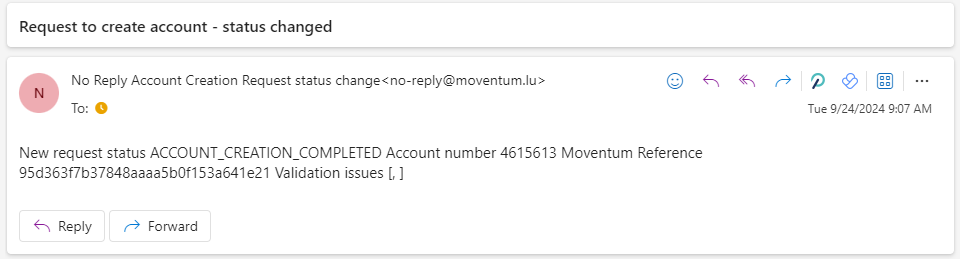
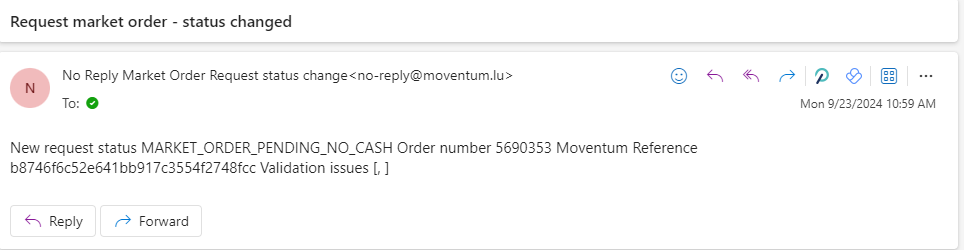
After subscribing to EMAIL notification you should start receiving mails like below for Account creation and Market Orders
curl "https://api-pilot.moventum.lu/subscribe" -X POST
                        -H "Authorization: Bearer <token>" \
                        -H "Accept: application/json" \
                        -H "Content-Type: application/json" \
                        -d "{\
  "responseCode": "7353194d29594b6a92629150b57e0290", \
  "responseType": "REST", \
  "destination": "http://target-end-point.com/?yourreference=reference" \
  "fallbackEmail": "yoursupport@email.com" \\  email from request highest priority , email of FA less priority, API user email least priority
}"
After subscribing to REST notification you should start receiving messages like below for Account creation and Market Orders to the provided endpoint with POST requests
 {
 "status":"ACCOUNT_CREATION_COMPLETED",
 "accountNumber":4999999,
 "responseCode":"16abcd17b3994db785f1f9ce13a726ea" // Moventum reference code to check status
 "validationMessages":["validation message1","validation message2"]// optional only in case request ending in error final state
 }
 {
 "status":"MARKET_ORDER_PENDING_WITH_CASH_ALREADY_TRANSMITTED",
 "moventumMarketOrder":172414,
 "responseCode":"16abcd17b3994db785f1f9ce13a726ea" // Moventum reference code to check status
 "validationMessages":["validation message1","validation message2"]// optional only in case request ending in error final state
 }
Upload/Download documents
This resource allows you to download documents for signing
curl "https://api-pilot.moventum.lu/document/{acountNumber}" -X GET
                        -H "Authorization: Bearer <token>" \
                        -H "Accept: application/json" \
This resource allows you to upload signed documents or client ids
curl "https://api-pilot.moventum.lu/uploads/aof/faNumber/{faNumber}/accounts/{accountNumber}" -X POST
                        -H "Authorization: Bearer <token>" \
                        -H "Accept: application/json" \
                        -H "Content-Type: multipart/form-data" \
                        -F "files=@C:\path\to\file.pdf"
Glossary
A complete reference to all fields can be located here
Template messages
XSD files for validation :
Account creations :